Macros & Variables
Generate dynamic test data with macros and reference shared values with workflow variables.
Macros & Variables
Macros generate fresh, unique data every time a workflow runs. Variables let you reference shared values across nodes — input data, macro results, and extracted values are all accessible as $var.{name}.
Both are available from the same $ typeahead in any macro-enabled field.
Syntax
Macro expressions follow the format $MACRO_NAME() or $MACRO_NAME(args). They can appear standalone or inline within a larger string:
- Standalone:
$EMAIL()resolves totest-a1b2c3d4@example-test.com - Inline:
user-$UUID()@corp.comresolves touser-4f3a1b2c-...@corp.com - Escaped:
\$EMAIL()produces the literal text$EMAIL()(no resolution)
Using macros
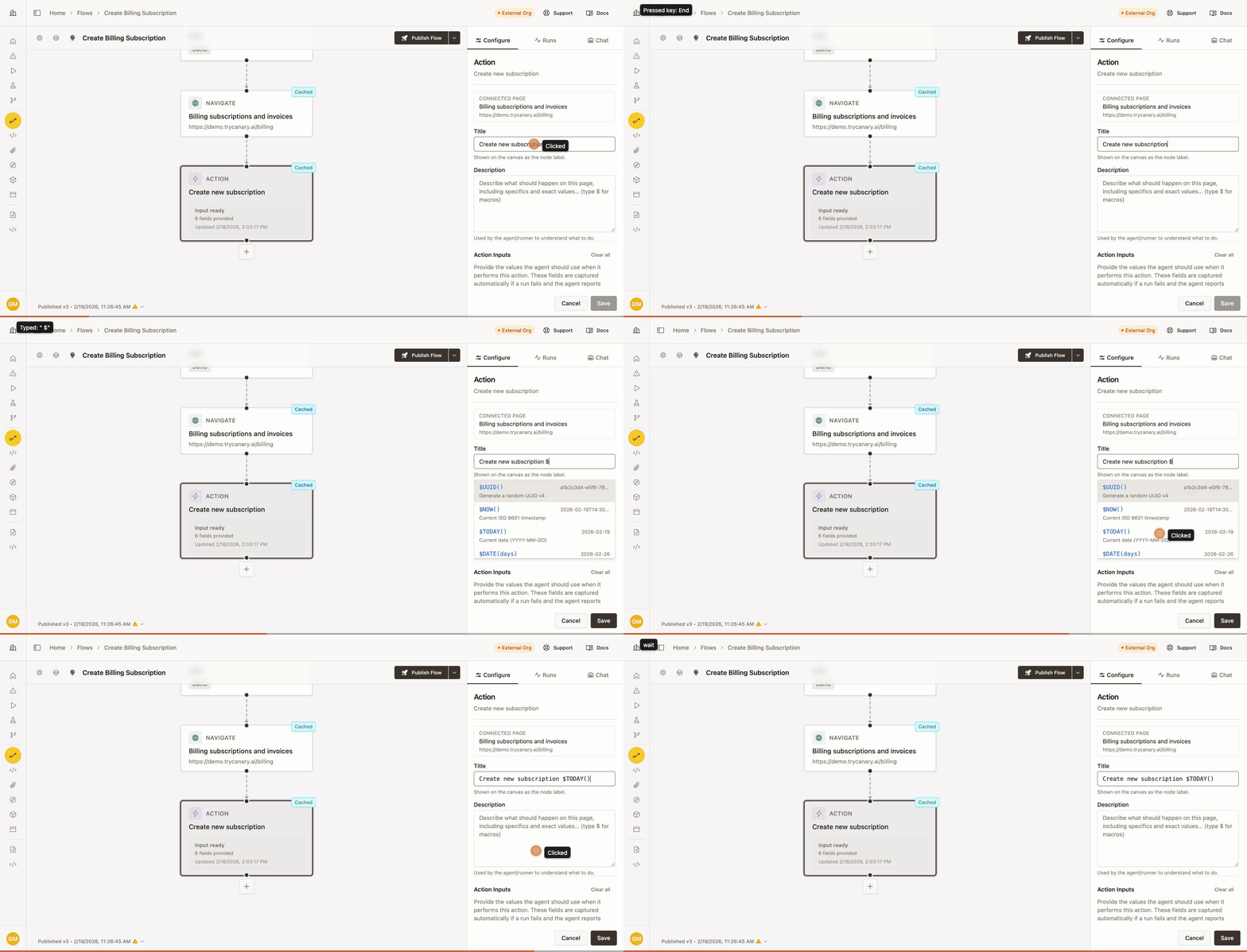
Type $ in any macro-enabled field to open the typeahead. Select a macro from the list or continue typing to filter. Macro expressions appear in monospace to distinguish them from plain text.
Macros work in:
- Action input fields (text, email, number)
- Action titles
- Action descriptions
Each run resolves macros independently, so every execution gets fresh values. Cached runs also re-resolve macros on replay.
Available macros
| Macro | Arguments | Output | Example |
|---|---|---|---|
$UUID() | — | Random UUID v4 | a1b2c3d4-e5f6-7890-abcd-ef1234567890 |
$EMAIL() | — | Unique test email | test-xk9mq2@example-test.com |
$FIRST_NAME() | — | Random first name | Jordan |
$LAST_NAME() | — | Random last name | Chen |
$PHONE() | — | US phone number (555 prefix) | +1-555-382-7491 |
$RANDOM_INT(min, max) | Two numbers | Random integer (inclusive) | 42 |
$RANDOM_STRING(length) | One number (1–1000) | Alphanumeric string | xK9mQ3bR |
$TODAY() | — | Current date | 2026-02-19 |
$DATE(days) | One number | Date offset from today | $DATE(-7) → last week |
$NOW() | — | ISO 8601 timestamp | 2026-02-19T14:30:00.000Z |
$TIMESTAMP() | — | Unix milliseconds | 1771520400000 |
$SEQUENCE("name") | Counter name | Auto-incrementing number per run | 1, 2, 3... |
Common patterns
Unique user registration:
Set the email input to $EMAIL() and name to $FIRST_NAME() $LAST_NAME(). Each run creates a distinct test user.
Numbered items:
Use $SEQUENCE("orders") to generate incrementing IDs. The counter resets with each new run and increments independently per name — $SEQUENCE("orders") and $SEQUENCE("items") maintain separate counts.
Date-relative testing:
Use $DATE(30) for a date 30 days in the future or $DATE(-7) for last week. Use $TODAY() for the current date.
Unique identifiers:
Use $UUID() for globally unique values or $RANDOM_STRING(8) for shorter random strings. Combine with text for readable IDs: order-$RANDOM_STRING(6).
Best practices
- Use
$EMAIL()instead of hardcoded addresses for any field that requires uniqueness - Use
$SEQUENCE("name")when you need predictable ordering within a single run - Prefer
$DATE(days)over fixed dates so tests stay valid over time
Variables
Variables let you reference values that are set during a workflow run. When an action node has input values, macros, or extracted data, those become variables accessible to other nodes as $var.{name}.
How variables are created
Variables come from four sources:
| Source | How it works | Example |
|---|---|---|
| Input | A value you enter in an action's input field | Setting a "company" field creates $var.company |
| Macro | A macro expression in an input field | $EMAIL() creates $var.email |
| Extracted | Data extracted from the page during a run | An extraction step creates $var.order_id |
| Credential | Values from the credential used in a login node | Login credentials create $var.username |
Using variables in fields
Type $ in any macro-enabled field to open the typeahead. Variables appear in green below macros in blue. Type $var. to filter to only variables.
Selecting a variable inserts $var.{name} — no parentheses needed, unlike macros.
Variables panel
When no node is selected in the Configure tab, the sidebar shows a list of all variables discovered across the workflow. Each variable displays its name and source. Click any variable to jump to the node that defines or references it.
Variables with an Input or Macro source have values at design time. Variables from Extracted or Credential sources are populated when the workflow runs.